The Contact List holds all your contacts: customers, prospects, suppliers and contact persons. On the left you see the list, on the right everything about the contact you've selected.
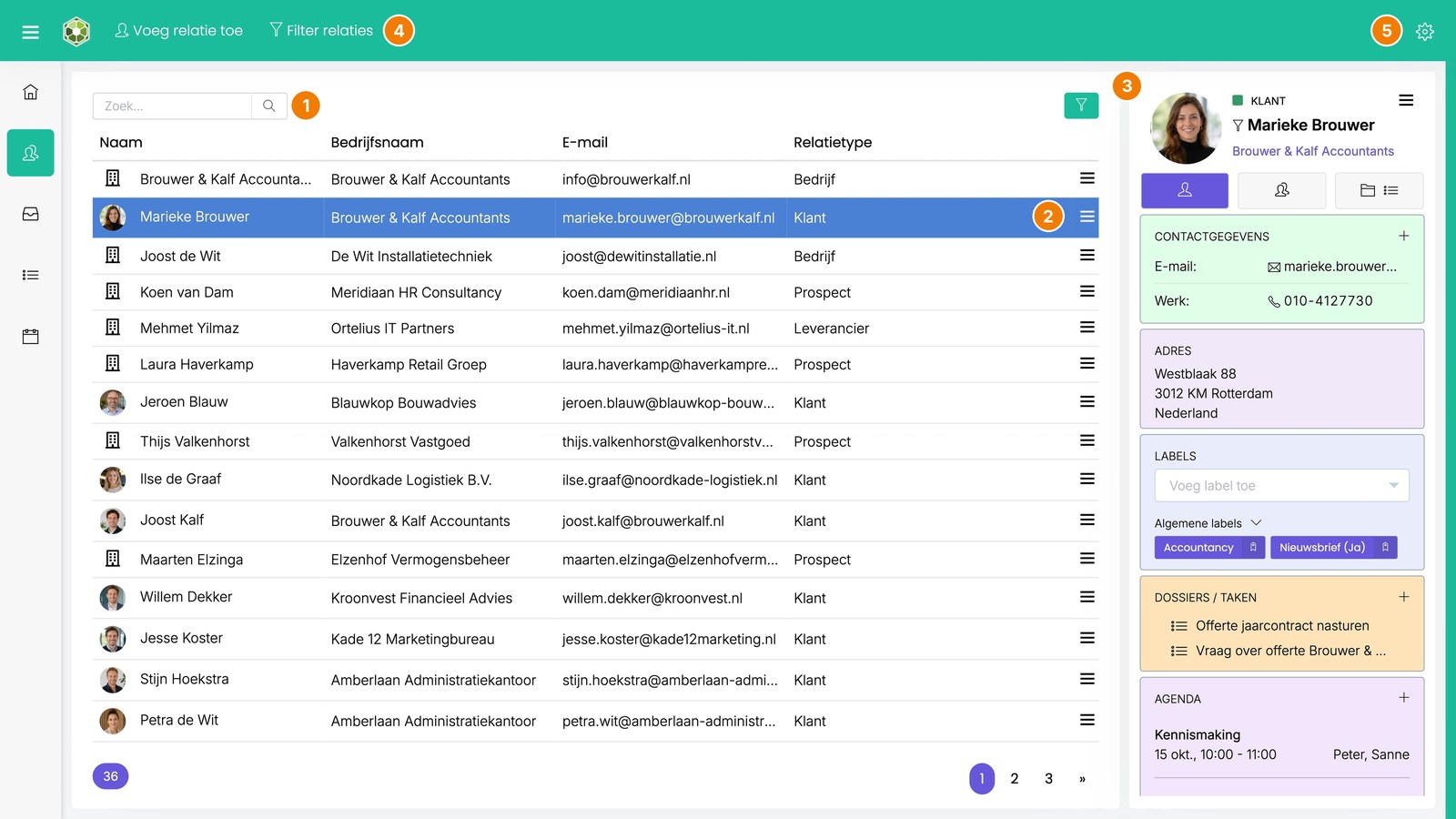
- Search field and contact list
- Menu with quick actions per contact
- The contact widget
- Add contact and Filter contacts
- Screen settings
Prefer to watch? The video shows how it works (in Dutch).
The contact list
- Search (1): type a first name, last name, company name or email address in the search field. Start with # to search by tag, for example #prospect.
- Order: contacts you've been in touch with recently are at the top. At the bottom left you see how many contacts are in the list.
- Opening the archive: double-click a contact. You then see all emails, appointments, tasks, notes and documents.
- Quick actions (2): right-click a contact, or click ☰ on the right of the row. For example, edit contact details, add an employee or merge contacts.
- Choosing columns: click the gear icon at the top right (5) and choose Customize widget, then manage the columns.
The contact widget (3)
On the right you see the details of the selected contact. Use the three tabs at the top to switch between the contact's details, the linked employees and the folders. The details are shown in blocks:
- Contact details: email addresses, phone numbers and websites.
- Address.
- Tags: the contact's tags.
- Folders / Tasks: the open folders and tasks.
- Calendar: the appointments for the next 30 days.
- Extra details: your own info fields, such as account manager or customer since.
- Linked contacts: for example a company's employees.
Use + to add something to a block. You choose which blocks you see and in what order via the gear icon (5): Customize widget. These settings only apply to you.
At the top (4)
- Add contact: Adding a contact
- Filter contacts: Filtering contacts
- Bulk actions: this button appears once you've filtered. Read more: Bulk actions: editing many contacts at once
Read also
Was this article helpful?
That’s Great!
Thank you for your feedback
Sorry! We couldn't be helpful
Thank you for your feedback
Feedback sent
We appreciate your effort and will try to fix the article