An activity shows what kind of work something is, for example Sales, Support or Day off. Each activity has its own color, so you see at a glance where your time goes.
Where do you use activities?
- Appointments: the appointment gets the activity's color in the calendar.
- Tasks: the colored square on the Kanban board. You can also filter by activity on the board.
- Folders: choose an activity when you create a folder.
- Time recording: recorded time is logged per activity.
Tip: keep your calendar clear
Use activities not only for the type of work, but also for what you want to see in the calendar. For example:
- Day off for holidays and days off;
- Meeting room to see when the room is booked;
- Sales for appointments with (potential) customers.
Keep it to a handful of activities. With too many colors, everyone picks something different and the color no longer means anything.
Adding or editing activities
You can only do this with the SpinOfficeAdmin right.
- Go to ☰ > Administration > Activity codes.
- Click the + at the top right to add an activity, or the pencil to edit one.
- Fill in the Group and Description and choose a Color.
- Save the activity.
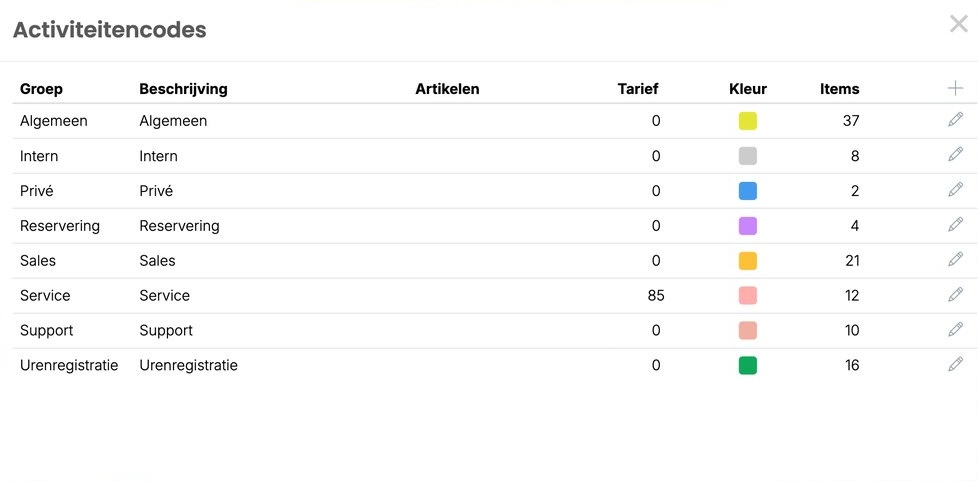
Under Items you see how often an activity has been used, so you can spot right away which activities don't matter.
Read also: Creating and assigning tasks and The Kanban board
Was this article helpful?
That’s Great!
Thank you for your feedback
Sorry! We couldn't be helpful
Thank you for your feedback
Feedback sent
We appreciate your effort and will try to fix the article