The «Content» field is the place in your email template where you type the text of your email. It's important:
- The cursor jumps to it automatically when you start a new email or a reply.
- If you switch templates while writing, your text stays.
- The AI assistant only works if the «Content» field is in your template.
Is the AI assistant not working in your email? Then your template is probably missing this field.
Adding the field
- Go to ☰ > Administration > Email > Email templates.
- Click Open and open your default template. Not sure which one that is? Check under Action types which template belongs to Email out.
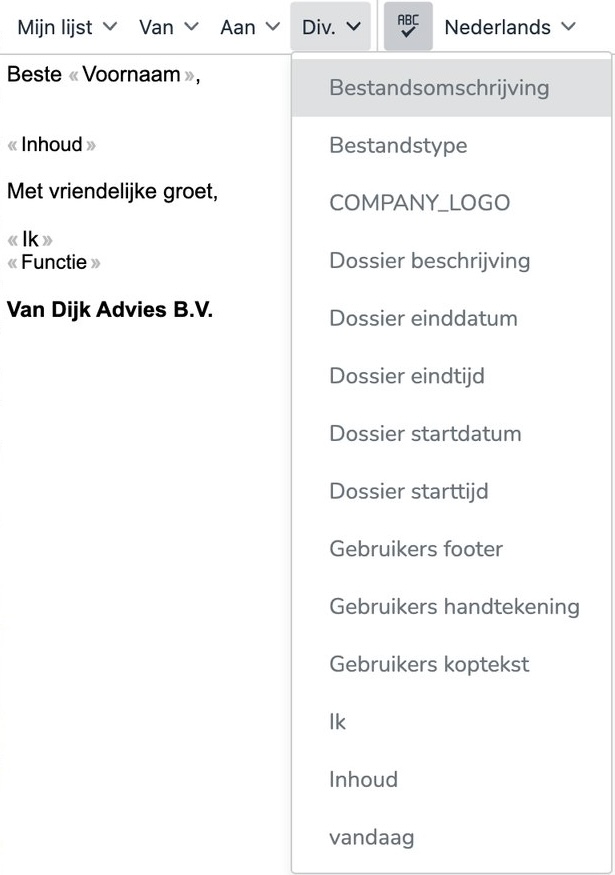
- Put the cursor on the line below the salutation.
- In the second bar, choose Misc. > Content. The «Content» field is now there.
- Click Save.
Using more templates? Then add the field to each template.
To edit templates you need the SpinOfficeAdmin or Manage email templates right. Don't have it? Ask an administrator in your organization.
Was this article helpful?
That’s Great!
Thank you for your feedback
Sorry! We couldn't be helpful
Thank you for your feedback
Feedback sent
We appreciate your effort and will try to fix the article