You add a new colleague in three steps: you invite the user, pay for the license and set up the rights.
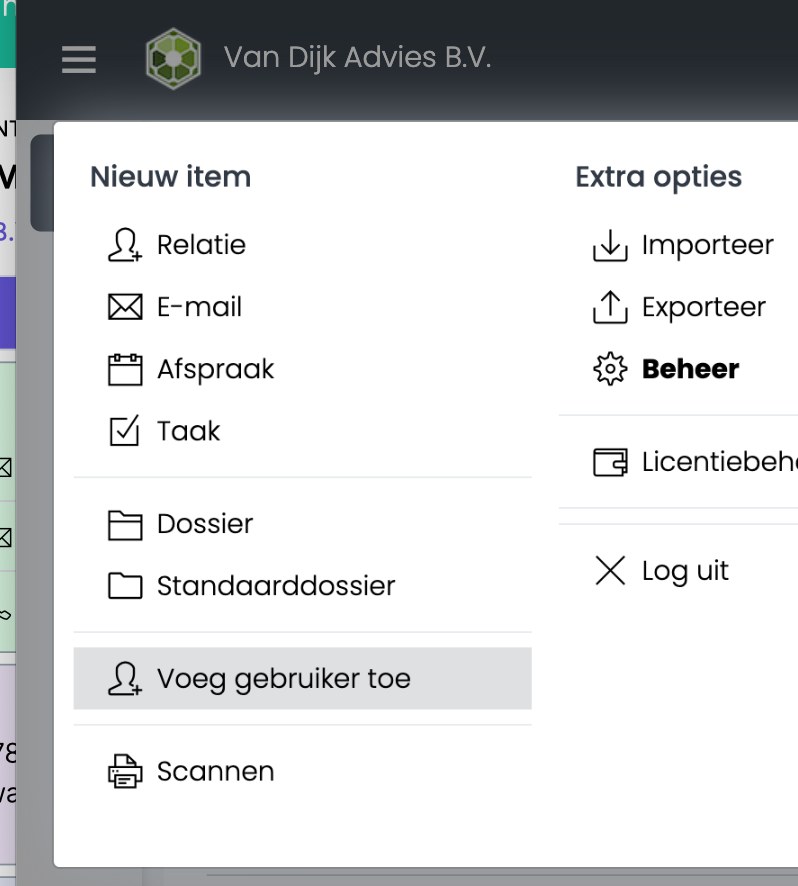
Step 1: invite the user
- Click ☰ and choose Add user.
- Enter your colleague's name and email address and click Next.
Your colleague receives an email with an invitation to sign in.
Don't see Add user? Then you don't have the right to invite colleagues. Ask an administrator.
Step 2: buy the license
- Go to ☰ Menu › Go to › License dashboard.
- At the top, choose Verlengen (renew), or Upgraden naar PRO+ for a Pro+ license. Your new colleague shows Geen licentie (no license).
- Tick your new colleague and click Voorstel maken (create proposal).
- Approve the proposal on the Voorstel tab, sign it and pay. Read how: Renewing your license
The license is valid for one year. After your payment, your colleague can get started within 15 minutes. You find your invoice on the Facturen (invoices) tab.
Step 3: set up the rights
A new user gets the default rights. They don't get administrator rights (SuperAdmin, UserAdmin and SpinOfficeAdmin); you turn those on yourself if needed. Want to change the rights? Read Managing users and rights
Was this article helpful?
That’s Great!
Thank you for your feedback
Sorry! We couldn't be helpful
Thank you for your feedback
Feedback sent
We appreciate your effort and will try to fix the article