With two-factor authentication, you log in with your password and a six-digit code from an app on your phone. Even if someone knows your password, they can't log in.
Two-factor authentication applies to the whole organization. Once you turn it on, every user logs in with a code. Nobody can skip it for themselves. That way you know for sure that all accounts are equally well protected.
Turning it on (administrator)
- Go to ☰ > Administration > Company preferences and open Security.
- Tick Enable 2-factor authentication with Google Authenticator and click Save.
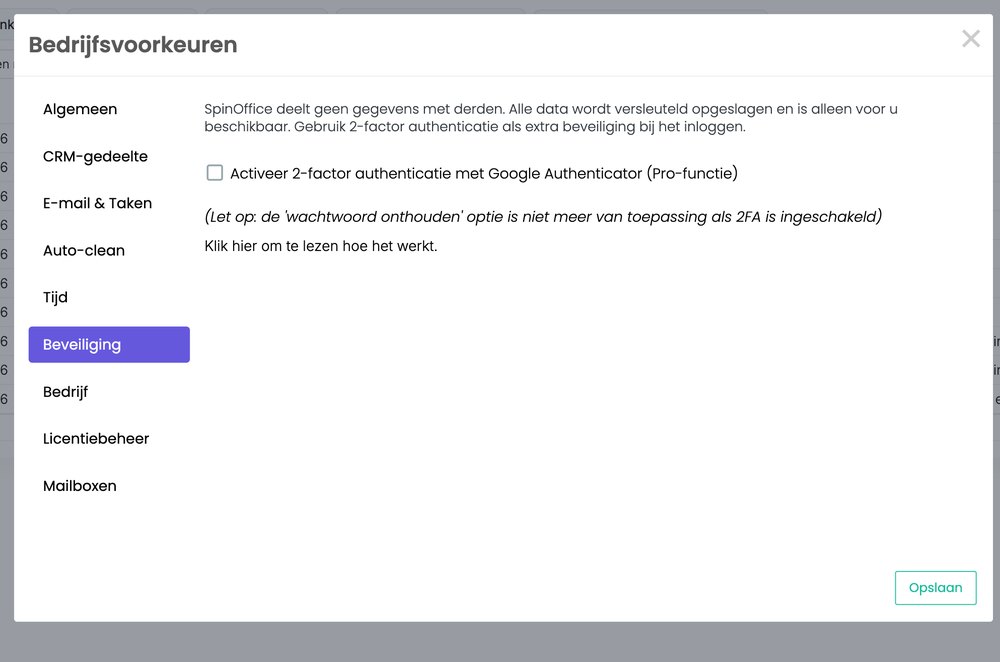
Let your colleagues know they'll need an app the next time they log in.
Logging in for the first time (every user)
- Install Google Authenticator on your phone (App Store or Google Play).
- Log in to SpinOffice with your email address and password.
- You see a QR code. Scan it with the app.
- Enter the six-digit code from the app and click Connect.
After that, SpinOffice asks for a new code from the app every time you log in. The 'remember password' option then no longer works.
Lost your phone or left it at home? Read Lost your phone with two-factor authentication
Was this article helpful?
That’s Great!
Thank you for your feedback
Sorry! We couldn't be helpful
Thank you for your feedback
Feedback sent
We appreciate your effort and will try to fix the article